From Version 9.100 there is a new Integrated Payment Method for Farmlands Cardholders, this only works for POS users.
Please be aware that this payment method cannot just be set up and used immediately. There is a process that needs to be done in conjunction Infusion Support and Farmlands.
System Wide
Admin / Settings / GL Cashbook / Manage Integrated Payment Methods
Select the Farmlands tab.
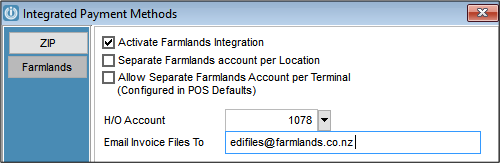
There are three options:
- Activate the Farmlands integration and assign a Head Office Account for all invoices to be charged to;
- Separate Farmlands account per Location, assign a separate Farmlands account per product Location. This will be linked to the location in POS Defaults. Note that this will require separate exports for each head office account if using the Farmlands Export file.
- Separate Farmlands accounts per Terminal. Assign a separate Farmlands account per POS terminal. Note that this will require separate exports for each head office account if using the Farmlands Export file.
Per POS Terminal
Farmlands must also be enabled in the Integrated Payments tab of POS defaults for each terminal. If option 3 was selected above, the Head Office account can be added in POS Defaults by selecting “Enabled – Terminal Settings”. If this is not set the default settings will be used.
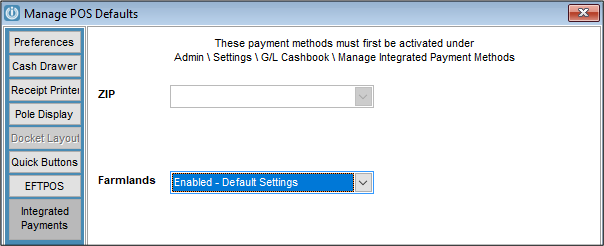
You can now use “Farmlands” as a payment method.
See also - Farmlands Integrated Payments for POS Users
Notes for current users of Farmlands
We recommend deleting any non-integrated banking methods called “Farmlands”
Use the existing process for creating and sending invoices to Farmlands until notified differently.
Please ensure you are following the terms of your agreement with Farmlands.
Printing Invoices and POS Dockets for Invoices charged to Farmlands
An updated layout may be required to print the invoice to ensure the invoice is to Farmlands – not to the customer.
Farmlands will display as the Payment Method on POS dockets.
Updated layouts are available on request from Infusion Support.
For Admin / Accounts
To export invoices and send to Farmlands - see: Farmlands EDI Export after Version 9
For information on processing payments and commission - see: Farmlands Payment and Commission
For information on POS processing - see: Farmlands Integrated Payments for POS Users
Comments
0 comments
Please sign in to leave a comment.