Customer Adjustments can be used for a variety of reasons and there are existing articles for:
- How Do I transfer a Balance from one Customer to another?
- How to Write Off Bad Debts
- How to Credit a Finance Charge
These are also used for
- Write off small balances
- Prompt payment discounts
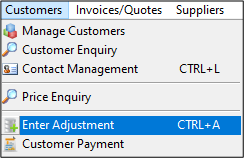
To use the Customer Adjustment go to Customer / Customer Adjustment
Select the Customer Account at the Prompt
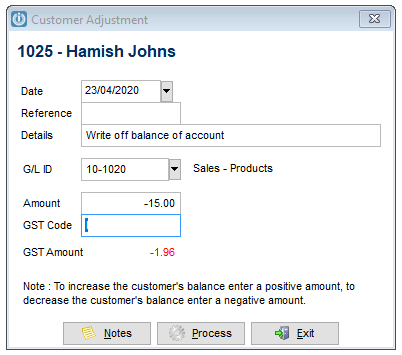
Enter the details of the transaction. Everything entered here will be recorded onto the Customers account and the GL ID. The GL ID will pick up the GST and it is important to read the note.
To increase the customers balance, enter a positive amount, to decrease the customer's balance enter a negative amount.
Process when finished.
Comments
0 comments
Please sign in to leave a comment.