Ensure you have an Expense – Transaction (GST Inclusive) GL code set up as Bad Debts in your financial chart.
Select Customers / Enter Adjustment
Select the Customer with the outstanding balance.
Enter the date on which it has been decided that the Invoice will be written off and considered a Bad Debt, a transaction reference, explanation, select the GL code Bad Debts and enter the amount to be transferred as a negative amount.
For example:
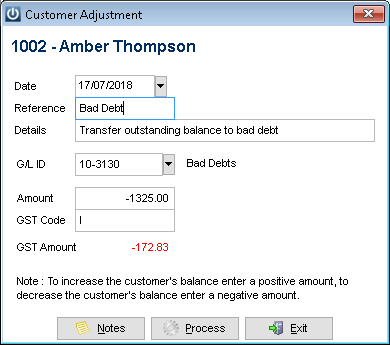
Select process, this will create a negative amount that can be received as a payment against the original Invoice in the Customer Payment screen.
Go to Customers / Customer Payment / Select the bank account / Select the Customer.
Receive the outstanding amount and the newly created adjustment at the same time which will result in a zero dollar transaction.
Comments
0 comments
Please sign in to leave a comment.