When searching for phone numbers in Infusion, the fields searched during a Primary or Secondary search are:
Phone and Mobile
Please see the article on Searchplus Column
The Fax column not included in the primary or secondary search. However, by right clicking at the top of the Fax column and entering a number into the box, the system will search down the Fax column.
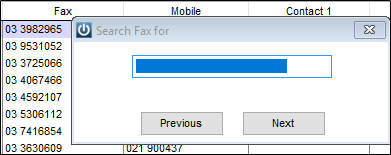
While inside the the Customer Record users can enter Alt and VOIP numbers, they are simply for recording purposes only.
It is recommended that a Contact is created where necessary.
Entering Phone Numbers
It is important to be aware that then searching for any phone number that they can be entered in any format eg 03 977 3645, 03 9773645 or 039773645 and they will be located. The same applied for Mobile numbers.
It is recommended that they are entered as 03 977 3645, as this makes it easier for users to follow the numbers when dialing them.
Comments
0 comments
Please sign in to leave a comment.