The Direct Debit module allows creation of an electronic Direct Debit file to be sent to the bank.
If multiple bank accounts exist within the GL, the bank account for the Direct Debit receipts to be paid into must first be selected by the user.
For a bank account to be valid for Direct Debit receipts, it must be set up with a Direct Debit Authority Number.
Contact your bank to get an Authority Number.
The date for the file must also be entered.
Note: If a file is sent to the bank after the date entered it will be rejected.
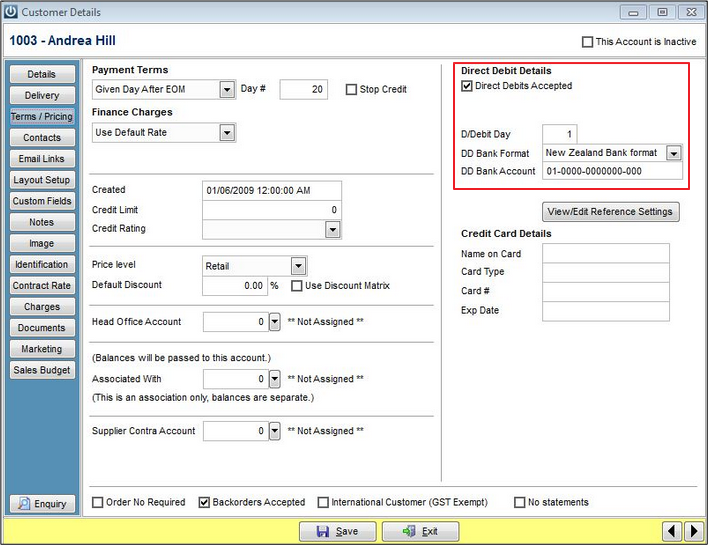
Enter Direct Debit information for the customer under the Terms/Pricing TAB
Go into the Cashbook and select Prepare/Export Direct Debits
The invoices that are due for payment will be showing in this screen
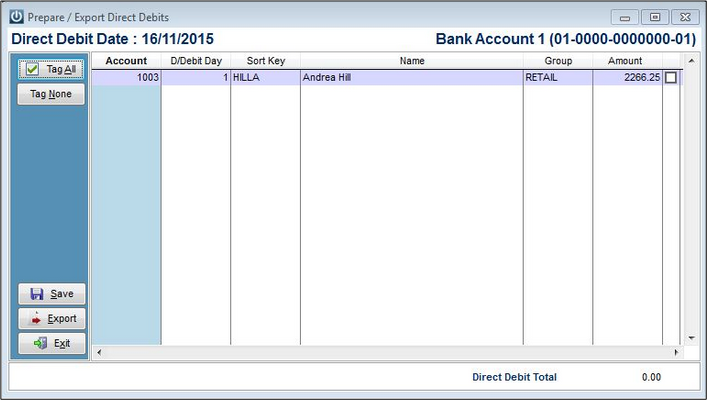
From the Prepare/Export Direct Debit screen tag the items you would like to Export.
The Tag All TAB will tag all the items on the screen.
Now Save or Export
When Export is selected the default file name is ddbatch.txt
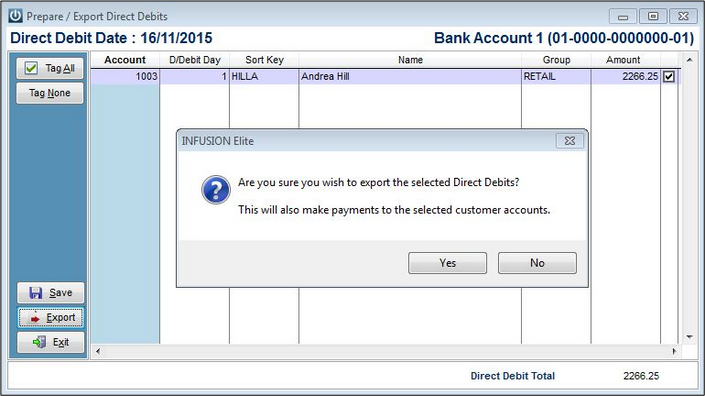
- When the file has been exported, the Payments will be recorded against the Customer Account.
- Cancel Current D/Debit Batch allows the deletion of the current Direct Debit Batch
- In the Cashbook Manual there is additional information available and there are other articles in the Knowledge Base with additional information on Direct Debits.
- At June 2021, the Kiwibank Export needs to be opened and at the end of the last line, hit "Enter" it will then be able to be imported Ticket #13584
The Direct Debit Date Logic:
=======================
The date supplied by the user is the date the direct debit will occur.
If this is the last day of the month (eg 28th February), direct debit days up to the 31st will be included.
The program will first select customers where they accept direct debits, and their direct debit date is less than or equal to the day of the direct debit date.
Then it will find all outstanding transactions DUE on or before the direct debit date and this will lead to the calculation of the amount of the direct debit.
Comments
0 comments
Please sign in to leave a comment.