The ability to set a Customer up as being International or GST Exempt is managed under the Terms and Pricing section of the Customer Details.

This box has to be ticked before a transaction is started. If an Invoice, Quote or Job is started and then the box is ticked, the transaction will still be recorded with GST.
The credit / recharge option will not remove GST from a posted invoice. You can create a credit but the lines on the new Invoice must be entered manually, after ensuring the GST Exempt box is ticked.
GST Inclusive or GST Exclusive Products
When the system is set to Selling Prices EXCLUSIVE of GST, setting the Customer as International is enough for the transaction not to ADD GST to the total.
When the system is set to Selling Prices INCLUSIVE of GST,setting the Customer as International is NOT enough.
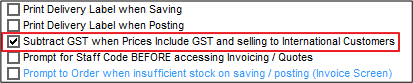
Go to Admin / Defaults / Manage Customer Defaults > Invoices tab and select "Subtract GST when Prices Include GST and selling to international Customers".
Comments
0 comments
Please sign in to leave a comment.