I email out letters from Infusion to for all our overdue Clients. But there are some overdue Customers that I do not wish to send the letters to for example they may be in credit or are regularly late payers. Is there any way to avoid sending them the letters?
Solution
By putting these selected Customers into a Group, you can send the letters to every one, except these selected Customers.
If you use the Customer Groups for Reporting purposes, run the Aged Trial Balance by Group. This will allow you to see the existing Group set up and who is going to be added to the newly set up Group.
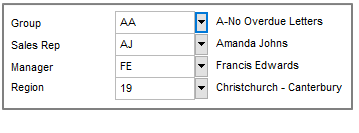
In the Customer Details screen select Group and New to create the Group. In the example below AA A-No Overdue Letters is the new Group.
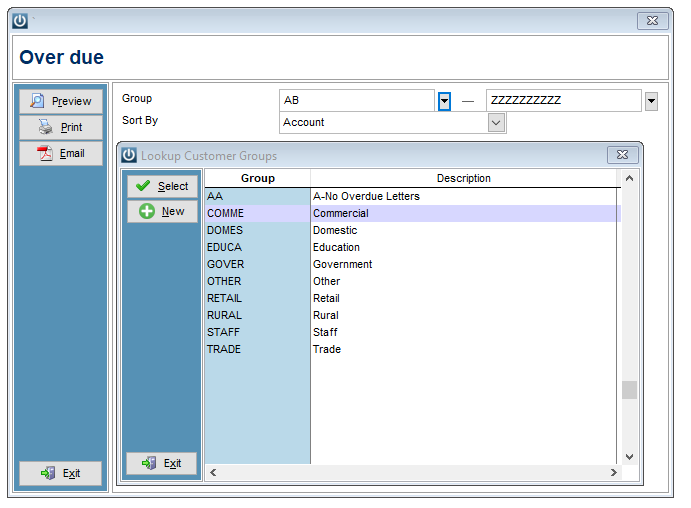
It is recommended that the Group is either at the start or the end of the Group range, to make it easier when selecting the range to send the letters to.
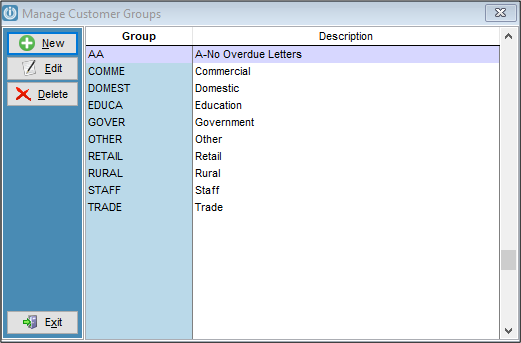
Place any Customers that you do not want to send Overdue letters into this group.
When sending the letter, make sure that you have a range added, and then choose the second Customer Groups on the list. This will not send to any Customers have been added to the No Overdue letters group.
If you use Customer Groups for reporting, refer back to the Aged Trial Balance by Group report to place the Customers back into the correct Groups after the letters have been printed.
Comments
0 comments
Please sign in to leave a comment.