How is the best way to send Consignment Stock to my Customers using Infusion?
Solution
It is recommended that you set up a Location for each of the Customers that you wish to send Consignment Stock to, In the example we have used Client A - Consignment as the name.
This is done by following these instructions
Create a Transfer by going to Products / Transfer Products and selecting for Originating Location and the To Location (Client A - Consignment)
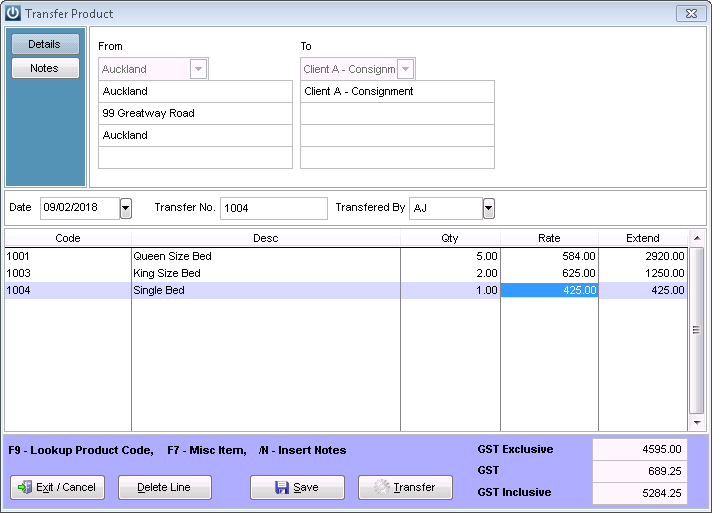
This will also generate a Stock Transfer Report to send with the Products to the Client.
This step can be repeated when other items need to be sent to the Client.
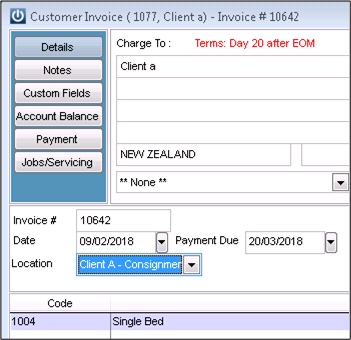
If the Client needs to be invoiced for Products, simply change the Location to the relevant Location, in this case Client A - Consignment. The Products will be invoice out of that location directly to your Customer.
The stock is still showing on the Product Valuation Reports and can be viewed by running a report by the Consignment Location.
If a Rep is going onsite then Print off the Stocktake by Location sheets to ensure all Products are accounted for.
Comments
1 comment
So, does that mean we can only provide consignment stock to 9 separate customers? There are only 10 location fields available, and obviously at least 1 of these will be used for our own warehouse.
Please sign in to leave a comment.