My emails to several Customers are not sending, why would this be happening?
Solution
When the user is processing the invoice are they seeing this message? If this message is not appearing the Customer has not had the email links set up.
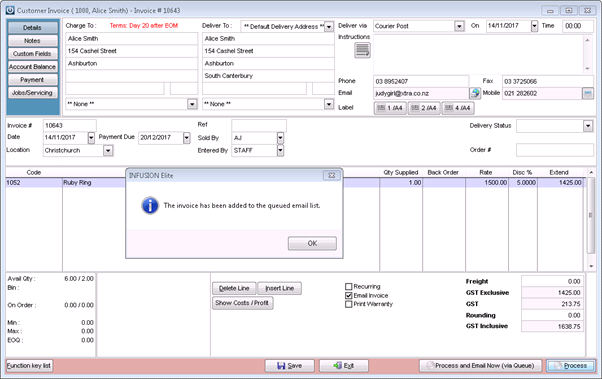
- Are the emails sending via the email queue? This would mean when going to check the email queue they are not waiting to be sent, they have already been sent. A check of the email audit trail would confirm this.
- See here for an explanation on the different type of email options.
- How are you logging into Infusion, is the name at the top of the Infusion screen a person or does is say Unknown User? Log off and back on as a genuine user if it is Unknown User.
- Go to Admin / Manage Email Defaults and use the Test Now button to send an email to your own email address, does this work? If there is an error read down the error log, what is it telling you is wrong? Have you changed the Password for the email? This needs to be changed in Infusion as well.
- From the Admin / Defaults / Manage Customer Defaults > Invoices Tab is the flag selected to Print Invoices? If Invoices are not printed then they will not be emailed either.
-
Selecting the ‘Post ALL’ option to bulk process pending invoices from inside the Manage invoices screen will not trigger the invoices to print OR email upon posting.
Therefore it is recommended to first select the ‘Print – All’ or ‘Email – All’ buttons at the bottom of the screen to generate customer copies before selecting ‘Post ALL’
This will print /send all invoices that are showing in that screen as Pending to the email queue.
Comments
0 comments
Please sign in to leave a comment.