A Contract rate is a special price set up against a Customer. The rate can be specified for a particular Product Code or a Product Group.
These can be updated in bulk from the Customer / Utilities / Update Contract Rates option.
To update rates select whether the range chosen will be for Products or Product Groups then specify the required ranges.
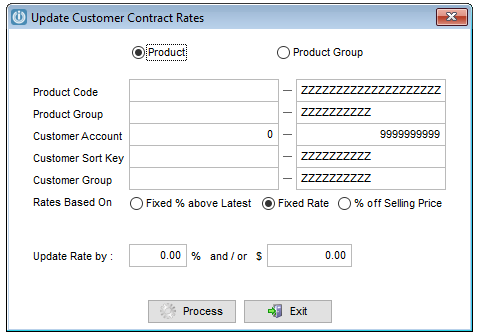
Next select whether the update will be based a Fixed % above the Latest cost, a Fixed Rate or a % off Selling Price for the Products.
Select the % and/or actual $ value for the updated then Process.
Important: The percentage or fixed rate entered will be added to the existing Contract Rates, it will not replace the existing figure.
It is recommended that a backup is done prior to updating Contract Rates.
Comments
0 comments
Please sign in to leave a comment.