I have added a note using the /N feature and then changed it but when it prints, the original note appears.
Solution
When using the /N function as below, the text box was opened up and the sentence was entered.
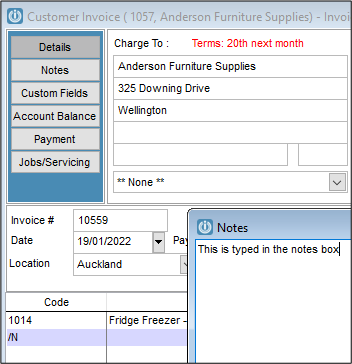
But if the text box was not opened up, the sentence was entered over top of the original
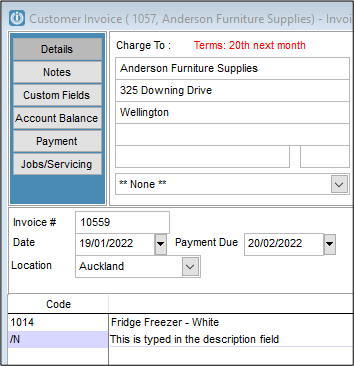
If you preview the invoice you will see the note that is typed in the Notes box not the one that was over typed in the description.
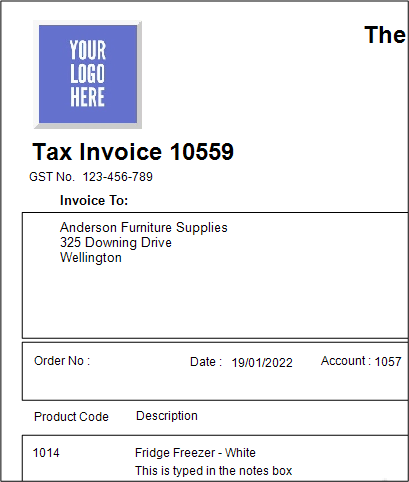
This also applies to the description for Buildups.
The reason for this is:
When you type text in the dialog box of the /N note, the text is stored in the ‘Note’ field of INVLN, which is a memo field. This will at the same time populate the ‘desc’ field of INVLN, making the text visible in the Description field of the form you are working on.
When you overtype that text in the description field of the form, the new text is only stored in the ‘desc’ field of INVLN, it does not override what is already in the memo field ‘note’.
All standard layouts in the software are configured to print a description whatever is in the ‘note’ field only, but you can customise a layout to print the description field instead
Continuing with the customer invoice example. Ensure the layout is added to the Custom Folder. Open Help / Report Layout Editor and select the relevant layout. In the Group Header locate the Product Line and right click to open the Properties.

Open the three dots and change the word ‘note’ with ‘desc’, as highlighted below.
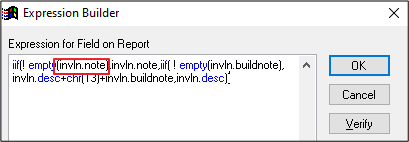
The corrected description will now print on the invoice.
Comments
0 comments
Please sign in to leave a comment.