Find Missing Invoices
To find either posted or pending invoices work through the following steps:
- Check Manage Invoices Screen
- Check Staff Location Settings
- Check Audit Files for Deleted Pending Invoice
- Check Partially Posted Invoices Report
- Check Audit files for Customer Defaults Change
Check Manage Invoices Screen
Invoices/Quotes – Manage Invoices
Search for the invoice number after completing the following steps:
- Remove any filters
- Refresh the screen
- Include Posted Invoices and search for the Invoice number
- Remove any filters from the right hand side of the screen.

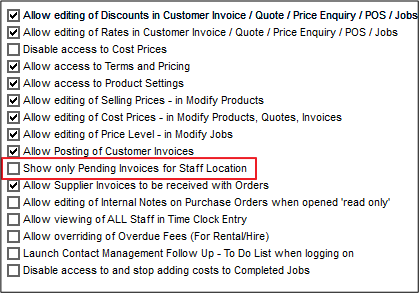
Check Staff Location Settings
Staff / Manage Staff / Login Tab
Is "Show only Pending Invoices for Staff location" checked?
Check Audit Files for Deleted Invoice
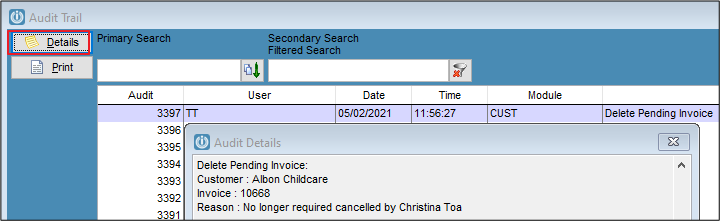
Admin / Other / View Audit Trail
- Secondary Search for "Delete Pending"
- Click Details for Details of deletion.
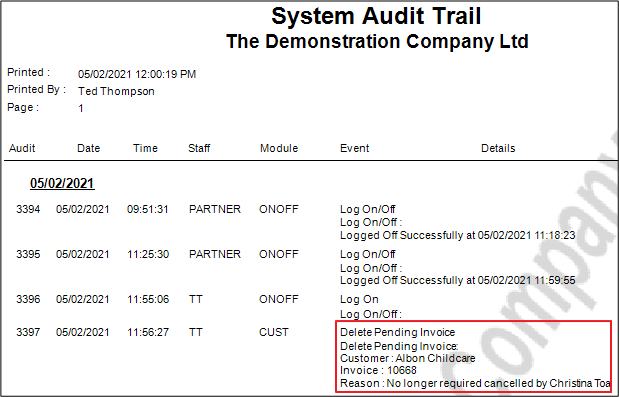
To search for an invoice number that may have been deleted:
- Click Print
- Enter the date parameters, Module = Customers and ensure Print Details is ticked.
- Preview
- Use the Find button
 to search for the Invoice number
Check Partially Posted Invoices Report
Admin / System Reports / Partially Posted Invoice Report
This report records Invoices that have not fully posted to all tables, usually due to a system crash or other event. If the missing Invoice (or any invoice) populates this report you will need to contact your Certified Partner or Infusion Support to check and possibly fix these Invoices. *Currently Jobs with Deposits record in this report in error
Check Audit files for Customer Defaults Change
The Invoice number may have been increased in the Customer Defaults. (Admin / Defaults / Manage Customer Defaults – Invoices Tab).
The details of this change are not recorded in the audit a "Customer Defaults Changed" record is created. This can be any change; not necessarily the Invoice number but could potentially explain the missing Invoice number.
Comments
0 comments
Please sign in to leave a comment.