It is possible to add a Location short code to an Order Number within the Purchase Order Layout, this has to be done by your Partner or Support staff. See Add Shortcode for Locations to Show on Purchase Orders
However, this will not actually change the Order Number within the software. A Purchase Order Hook File is available on request which will add the short code to the Order Number itself, meaning the short code is viewable within Infusion, on the Manage Purchase Order screen and within the Supplier Enquiry.
It is controlled by adding the shortcode to the Product Location screen. Admin / Setting / Products / Manage Locations.
Add in the code under the Position field.
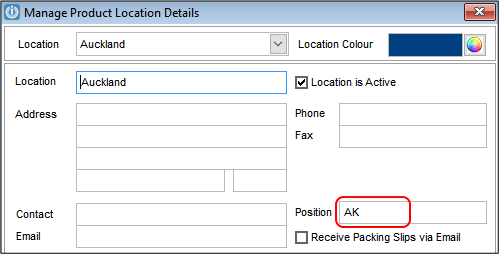
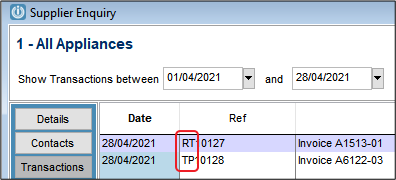
When the order is created, the shortcode will show before the order number.

It is also visible in the Supplier Enquiry screen.
Please contact your Partner or Support if you would like this Utility. The Utility is free, but we do charge for the installation. Utility - Purchase Order Prefix Location Installation Notes
Comments
0 comments
Please sign in to leave a comment.