There is a Customer Contract Rate Import Utility available from Infusion Support or your Partner that will allow the importing, updating or deleting or Customer Records. The utility is free, but the installation will be chargeable.
Customer Selection is done at the top, while your .csv file will have the Product / Product Group details.
You must have the Product Code and the Record Type (P= Product or G=Group) loaded in the spreadsheet.
The import will either add or update contract rates for the customers selected in the top section of the utility.
The utility set as below will update all customers with an account number between 0 and 5000, in customer group “TRADE” with “AJ” as their MANAGER.
PLEASE NOTE: Run a Backup before using
The utility first deletes any currently loaded contract rates for the selected customers.
It then replaces them with the rates as per your .csv file. This means that simply importing new start and finish dates without including the rate will over-write the rate with zero.
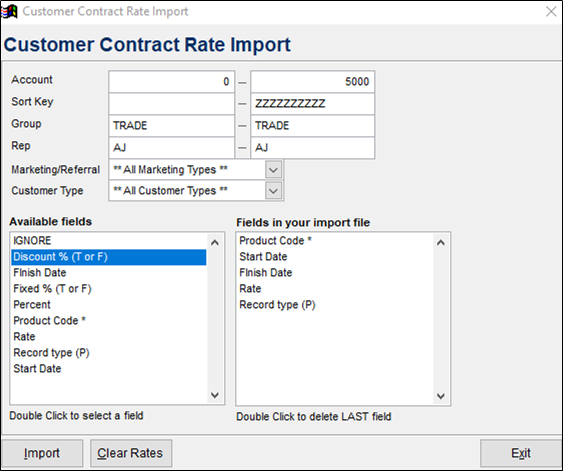
The utility is saved into the Data Folder and runs from a shortcut on the desktop. It requires a CSV using the Available Fields, just like an Import Routine.
To delete out existing contract rates, add only the Product Code to the CSV.
The Customers Contract rate will display
But this will not show on the Contract Rates report.
Comments
0 comments
Please sign in to leave a comment.