The ability to add quantity breaks will allow a Customer a better price if they purchase more units at the same time.
Users can set up to three different quantity levels at which the price will change once the quantity has been reached on a single invoice line.
The set up is done on the Pricing tab of the Product
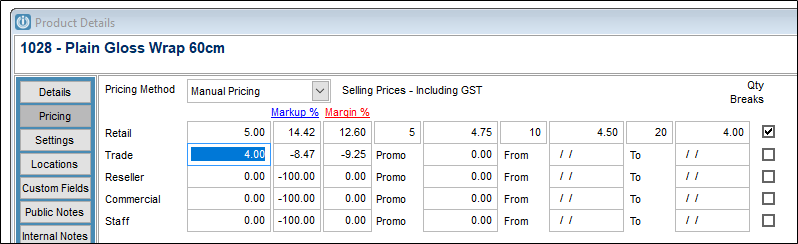
When the product is added to the Invoice with the correct quantity, the pricing will change.
On the invoice, the Product Rate Shows in Red
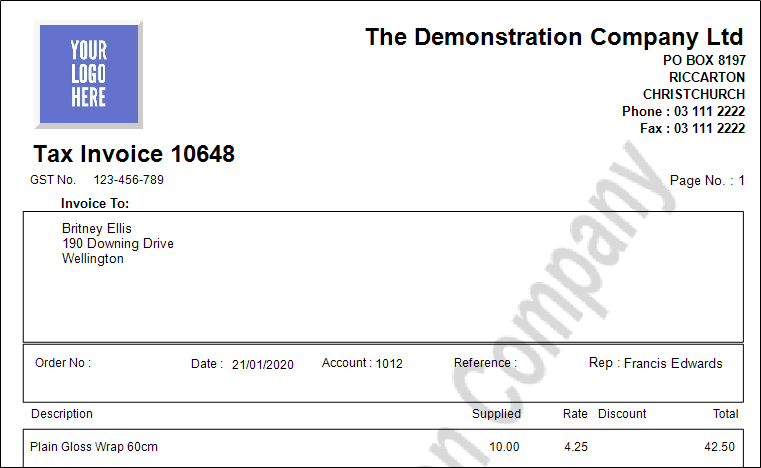
Please note that if the first level is set to being 1 unit, the user must enter across the the invoice line for the calculation to take affect. If this is not done, the sell price will stay at Retail. This is because this field would not usually start at 1.
To report on product with Quantity Breaks, see Products / Pricelist / Pricelist - with Quantity Breaks.
Also see Product Showing on Quantity Break Pricelist Incorrectly
or Infusion Pricing Rules to see what happens when Customers have discounts, promo pricing or contract rates set up.
Comments
0 comments
Please sign in to leave a comment.