To charge out the cost of consumables to Customers a Product code should be set up in as:
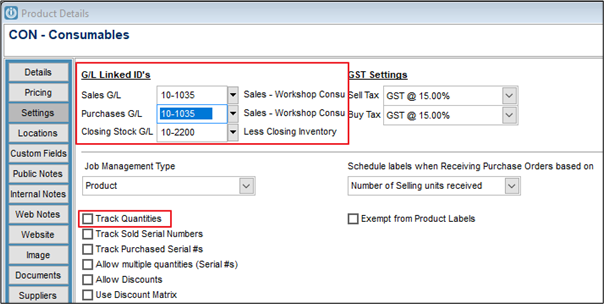
By selling this Product code, revenue and costs associated with Workshop Consumables (eg. cleaning, materials etc.) can be tracked.
Accounting for the cost of Workshop Consumables
Taking Stock from the Shop to use in the Workshop
From the Service/Workshop screen create a new job called Workshop Consumables.
This job will continue to build up during the month
At the end of the month an extra line is added to the job, coded to the product code created above (WC Workshop Consumables) and set to reverse the total of the job.
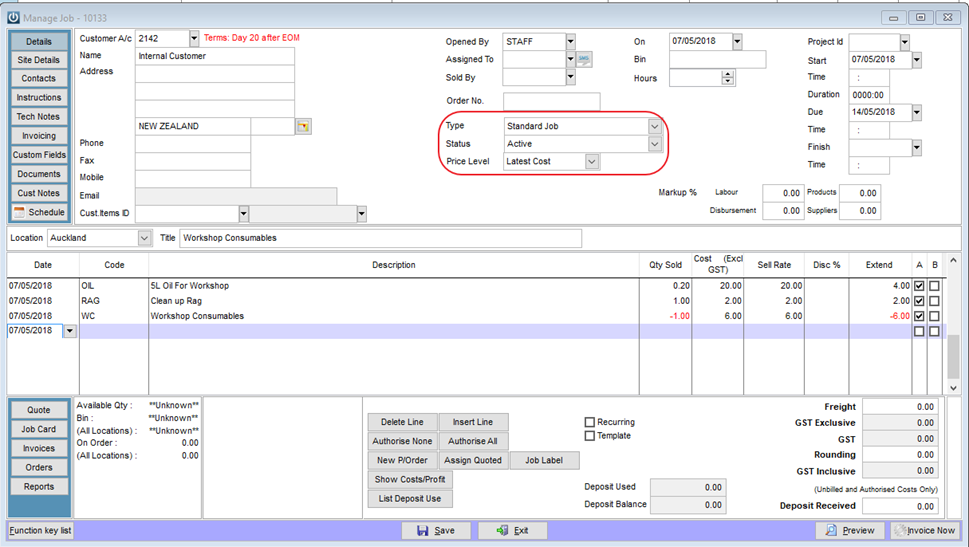
This will reduce the value of the invoice to $0
The invoice may now be posted.
Ordering stock from a supplier which will be used directly in the Workshop
Stock needed for Workshop Consumables should be ordered on a Purchase order with the Job Number for Workshop Consumables attached. This will bring the item into stock and automatically charge it to the Job for Workshop Consumables at Cost price.
Comments
0 comments
Please sign in to leave a comment.