The branch reports available are designed to be used where the General Ledger chart has been set up with 3 Divisions / Branches / Locations, and a Consolidation section. Each Branch will have its own Sales section, Cost of Goods Sold section (including Opening and Closing Stock) and Expenses sections.
All of those Branch accounts will add down into normal totaling accounts and into the total net profit; but they will also add down into a Consolidation section.
To utilise the Branch Profit and Loss Reports the accounts in the General Ledger chart must be set up with two additional fields.
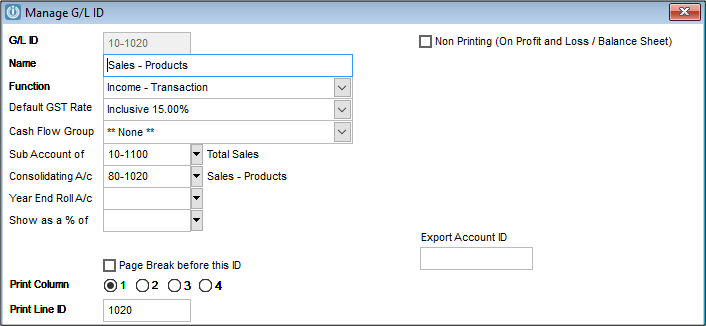
The first field (Print Column) defines what column / Branch the account is to print in. Each Branch General Ledger account will print out in either columns 1, 2 or 3.
Column 4 is for the Consolidation account.
The second field (Print Line ID) is assigned a ID which enables the report to place the correct General Ledger accounts together on the same line of the report ie so the sales for Branch 1, 2 and 3 and the Consolidation Sales account – all have a common Branch GL ID.
In the Demonstration Company the chart has been designed so that the Branch is the prefix eg '10-', '20-', '30-' and the Consolidation section is '80-'
The next 4 characters identify the GL account, and are repeated in the Branch GL ID field for the branch report. eg '1020' is Sales – Products; '3150' is Cleaning Expense.
Users with existing charts which are not so structured, can still use the Branch Profit and Loss Reports, by defining the structure within the two fields described.
Every General Ledger account which prints in the Profit and Loss has to be able to be defined with its branch and the branch GL ID
Comments
0 comments
Please sign in to leave a comment.