Use Dimensions
A Product can be set up to use dimensions when it is sold e.g. sheets of glass, sheets of plywood, steel plate.
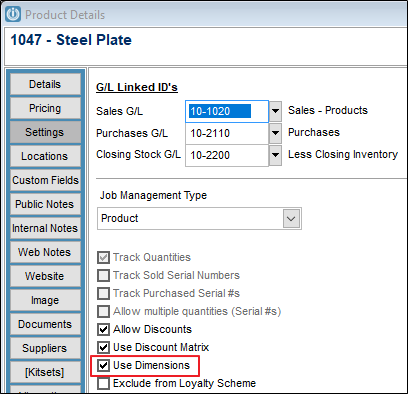
On the Product Settings tab, select the Use Dimensions flag.
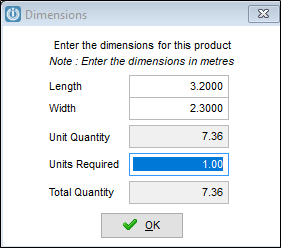
When you add the item to an invoice, on the Qty Supplied column a prompt appears so that the dimensions for the products can be entered it will calculate the resulting total quantity for the invoice line. Note, the dimensions should be entered in meters.
The invoice will show the details from dimensions prompt.

Selling by the length
A product can also be sold in lengths.
In this case do not tick the Use Dimensions flag. On an invoice line select the F9 key while the cursor is in the Qty column to bring up a Quantity Buildup screen.
On that screen multiple lines are keyed in with the qty and unit (length) of the item being sold and again the total quantity is calculated and displays on the invoice line.
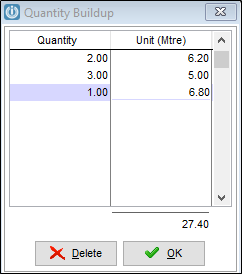
When the invoice is printed the Quantity Buildup will display under the line

In both situations the correct quantity is removed from stock.
Partners see Recording Product Dimension in Tables
Comments
0 comments
Please sign in to leave a comment.