We have recently moved and need to update our Business (Company) Details in Infusion. Where do we do that?
Solution
This can now be done on our website, see Changing Registration (Licence) Details
The form with a new licence number will be returned to you normally within an hour. Then go into Admin / Other / Enter License information and update.
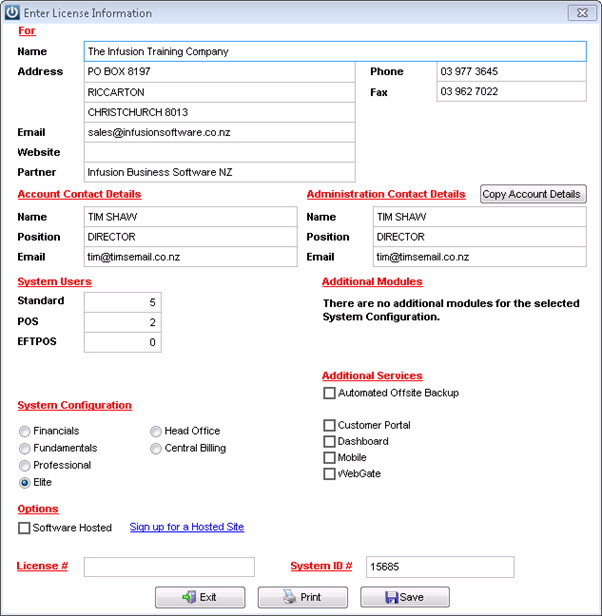
Your new License number and your new details will now print through on any Invoices, Statements, Purchase Orders, Reports etc.
Exceptions:
Where you use a logo with your address. This will need to be changed by your logo designer and replaced in your customised Invoices, Statements, Orders etc.
Your layout has been customised/modified and your contact details hard coded into your layouts.
Your Partner or Infusion Support can assist with updating customised layouts, but this will be chargeable.
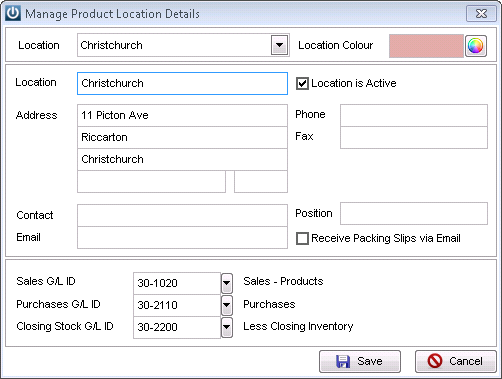
To change your site address on Purchase Order Layouts and Supplier labels, go to Admin / Settings / Products / Manage Location and enter your new address there.
Comments
0 comments
Please sign in to leave a comment.