We use Office 365, how do we set this on so we can Email from the software?
Solution
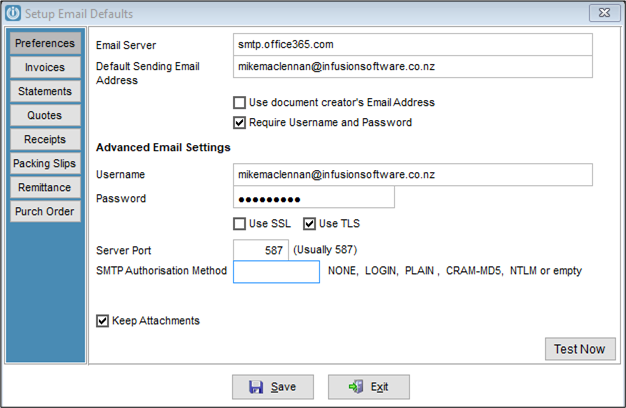
Email Defaults are set up under Admin / Manage Email Defaults
Email Server: smtp.office365.com
Default Sending Email Address: The email address that you are setting up.
Do not tick Use document creators Email Address. See below*
User Name: your office365 username
User Password: your office 365 password
Tick Use TLS
Server Port: 587
SMTP Authorisation Method: blank or "LOGIN"
See example below
Save
Open the Email Defaults and send a Test Email.
If the Test email records a SMTP Error, see this article on How To Allow SMTP Connections from Office 365
Email from a Different Email Address with Office 365
Test Email Working but selected emails not sending
Email defaults are set to use an Office 365 / Exchange smtp relay and they are using their own email to test with.
If the relay is not configured with the correct IP address you can still send emails to Office 365 address all other email address will not send. So using your own email to test with will work okay.
Try doing the test with an email address from Spark, Gmail or Hotmail and you should get an error message and towards the bottom you should see
readSmtpResponse:
SmtpCmdResp: 550 5.7.64 TenantAttribution; Relay Access Denied [SY4AUS01FT016.eop-AUS01.prod.protection.outlook.com]
--readSmtpResponse
This means the relay is not setup correctly see the How To Allow SMTP Connections from Office 365.
Emails not recording in the Outbox
see the How To Allow SMTP Connections from Office 365.
Comments
0 comments
Please sign in to leave a comment.