How do I remove a Product from stock and place it in the Rental Hire Module or change it to a Fixed Asset?
Solution
Create an invoice to your Internal Company where the first line is the product code, with qty of 1 and at cost price. You can keep adding products if necessary.
Then, add another line where you will use the General Ledger code of the Rental Hire Purchase or Fixed Asset, with the qty of -1 and for the same value – the result is a zero total invoice.
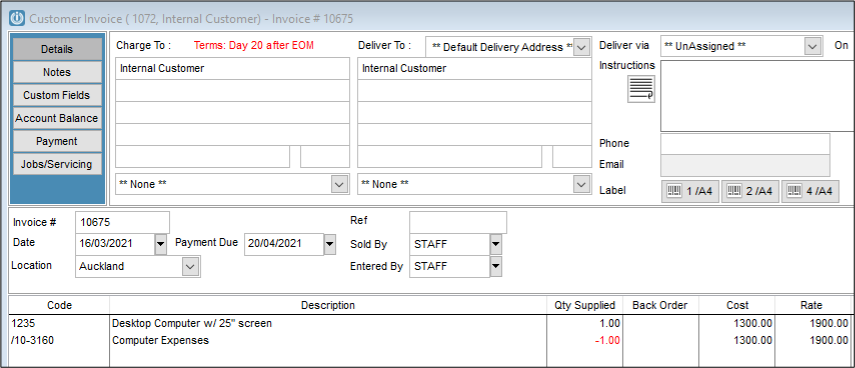
The first line is the one taking the item out of your stock and the second line is the one registering it in your financials.
Rental Hire
Finally, you have to create the Rental Hire item manually on the RH register.
If you do not already have a Rental Hire Purchase GL code in your Financial Chart, you will have to create one before you do the invoice, and it must be set as if it was a Fixed Asset type of account, and GST inclusive.
Fixed Asset
If adding to the Fixed Asset Register, see Entering a Fixed Asset
Comments
0 comments
Please sign in to leave a comment.