A Product can have a Pricing Method of Manual Pricing or Product Group Markup, or a combination of both.
Manual Pricing allows entry of a price for each named Product Price Level, for the Product.
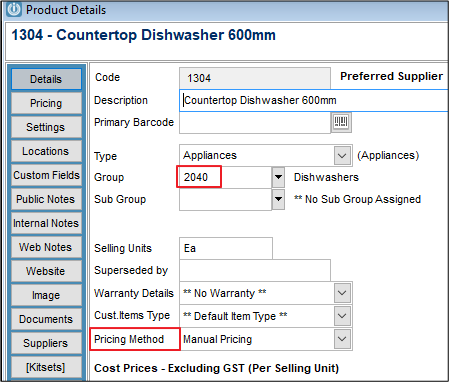
Product Group Markups will use the Product Group selected under the Details tab of the Product, and the percentages for each Price Level, activated for Markups, in the Settings for the Product Group.
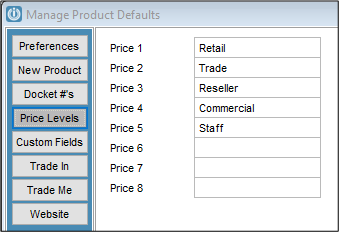
The Price Levels for Products are set up under Admin / Defaults / Manage Product Defaults (Price Levels tab). Prices and Markups can only be entered against named price levels.
When using the Pricing Method Product Group Markup
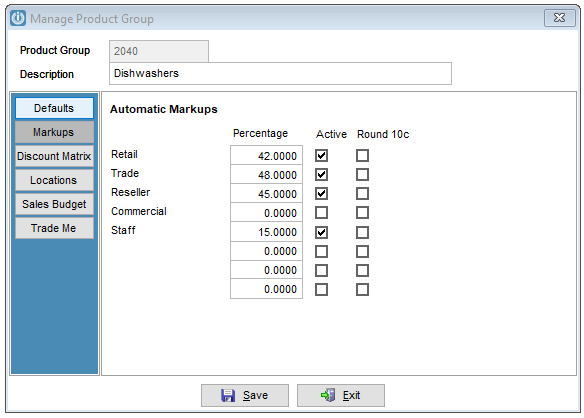
- set-up the Markups in Admin / Settings / Products / Manage Product Groups
- create a new Product Group or edit an existing Product Group
- select the Markups tab
- enter in Percentages against some or all of the Price Levels, and tick Active.
In the Product record
- the Selling prices can be manually adjusted and the field will not be greyed out if
the Product Pricing Method is set to Manual Pricing,
or
the Price Level has not been made active for Product Group Markups,
- when the Product Pricing Method is set to Product Group Markup and the Price Level has been made active for Product Group Markups, the Selling price is greyed out and cannot altered.
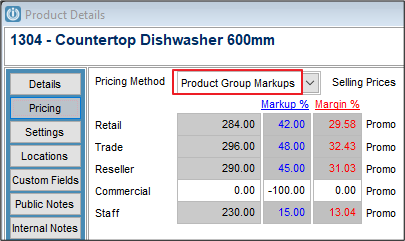
When Product Group Markup has been selected, the selling price is re-calculated when the Product record is modified and saved
or
when the user runs the Products / Utilities / Recalculate Product Selling Price
The calculation is Cost price x Product Group Markup percentage eg 50% .
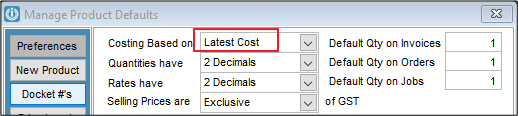
The Cost Price used will be either Latest or Average - depending on the setting under Admin / Defaults / Manage Product Defaults
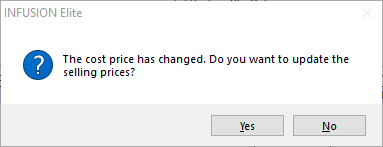
Note: When products are set to Product Group Markup, the message "The cost price has change. Do you want to update the selling prices?" does not appear. The automatic markup is applied.
Comments
0 comments
Please sign in to leave a comment.