When I scan a code in POS I want the cursor to drop to the next line. How can I set Infusion up to do this?
Solution
Change the POS defaults to the following:
* Skip Descriptions
* Skip Quantity
* Skip Rate
* Skip Discount
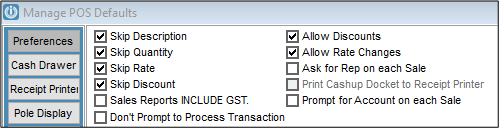
If the user wishes to go back to the previous line, to change any of the details, they can
Use the mouse and click into the field(s)
Quantity Rate or Discount
Use the ‘up-arrow’ key and then the ‘Tab’ key to get into the Description field
Comments
0 comments
Please sign in to leave a comment.