Our Queued Emails are not sending.
Solution
Have you used the Test Now Button under Admin / Manage Email Defaults to test the sending of an email? Is this working correctly?
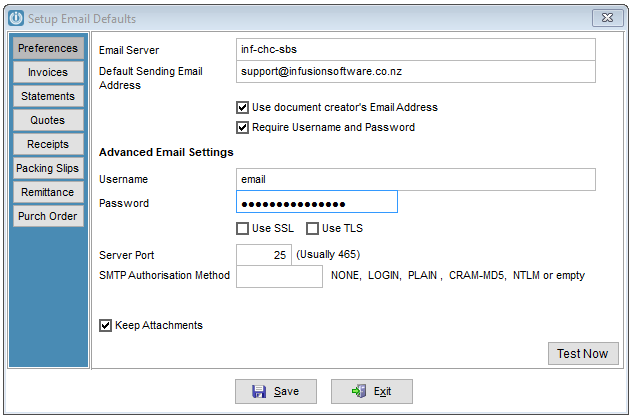
- Has the email password recently been changed, this will need to be updated in Infusion as well?
- Is the email address you are sending to correct? Copy and paste to a word document and enlarge to confirm.
- Is Microsoft Outlook your default email? Has it been installed in 32 bit? This is the required setting to send emails from Infusion.
- Has the Default Sender got an out of office message set up? Messages will not send if this is in place.
- What email address is set up under the staff member's Staff settings?
- Delete and enter the Headers in the Subject lines after the system crashed.
- Are you sending to more than one email address from the queue? Email Address must be separated by a comma not a semi-colon
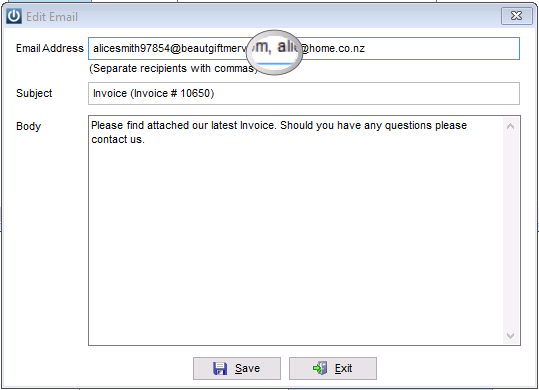
- My Invoices are not sending, but my Statements are. Shorten the text in the Message Body
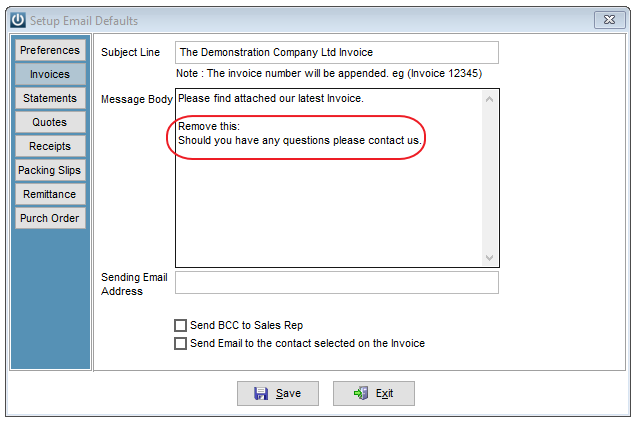
- Can you send both Invoice and Statements? Check the length of the messages.
- Are you sending from a Gmail address? Check Email Defaults for Gmail
- Yahoo will block third party apps. Please set up a password to allow Infusion to send emails
- Sending from Office 365 from November 2022 requires the latest Chilkat ActiveX Installer 32 bit version.
- Check the Test Message does it show, "554 5.7.1 Message rejected due to possible spam content" If the Server is Xtra, contact the Business Hub.
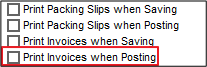
- Has the Admin / Defaults / Manager Customer Defaults > Invoices Print Invoices when Posting been unticked? This will stop the creation of the emails.
- Is the Email Server using gorkon.interspeed.co.nz? This is a test email server, replace with the actual settings from your default email program.
- Are you getting a message back "Your message contains invalid characters (bare line feed characters) which the email servers at (Recipients email address) do not support?"
Comments
0 comments
Please sign in to leave a comment.