The difference between margin and mark-up is that margin is sales minus the cost of goods sold, while mark-up is the amount by which the cost of a product is increased in order to derive the selling price. A mistake in the use of these terms can lead to price setting that is substantially too high or low, resulting in lost sales or lost profits, respectively.
Margin (also known as gross margin) is sales minus the cost of goods sold. For example, if a product sells for $100 and costs $70 to manufacture, its margin is $30. Or, stated as a percentage, the margin percentage is 30% (calculated as the margin divided by sales).
Markup is the amount by which the cost of a product is increased in order to derive the selling price. To use the preceding example, a mark-up of $30 from the $70 cost yields the $100 price. Or, stated as a percentage, the mark-up percentage is 42.9% (calculated as the mark-up amount divided by the product cost).
The mark-up calculation is more likely to result in pricing changes over time than a margin-based price, because the cost upon which the mark-up figure is based may vary over time, or its calculation may vary, resulting in different costs, which therefore lead to different prices.
The following points note the differences between the margin and mark-up percentages at discrete intervals:
To arrive at a 10% margin, the mark-up percentage is 11.1%
- To arrive at a 20% margin, the mark-up percentage is 25.0%
- To arrive at a 30% margin, the mark-up percentage is 42.9%
- To arrive at a 40% margin, the mark-up percentage is 66.67%
- To arrive at a 50% margin, the mark-up percentage is 100.0%
Desired Margin / Cost of Goods
An example: if you know that the cost of a product is $7 and you want to earn a margin of $5 on it, the calculation of the mark-up percentage is: $5 Margin / $7 Cost = 71.4%
If we multiply the $7 cost by 1.714, we arrive at a price of $12. The difference between the $12 price and the $7 cost is the desired margin of $5.
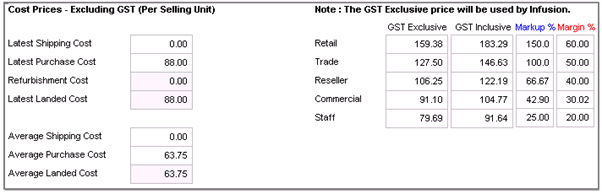
Within INFUSION the Product prices display the latest and average along with the available selling prices.
You may manually enter either the GST Inclusive, or exclusive rates, as you do you will see the mark-up and margin change.
Alternatively, you can manually adjust them mark-up or margin values and INFUSION will adjust the selling prices.
Comments
0 comments
Please sign in to leave a comment.