To set up a Float for POS
Create a General Ledger Account for the POS Float - a Current Asset Transaction account
On the Admin / Defaults / Manage Financial Defaults screen, enter the General Ledger Account as the POS Float.
Process a Cash Book Payment to record the money being taken from a Bank Account and retained as the POS Float.
When balancing a cash drawer the opening and closing float values can be recorded If this is omitted, then it is assumed that the Float balance has not changed.
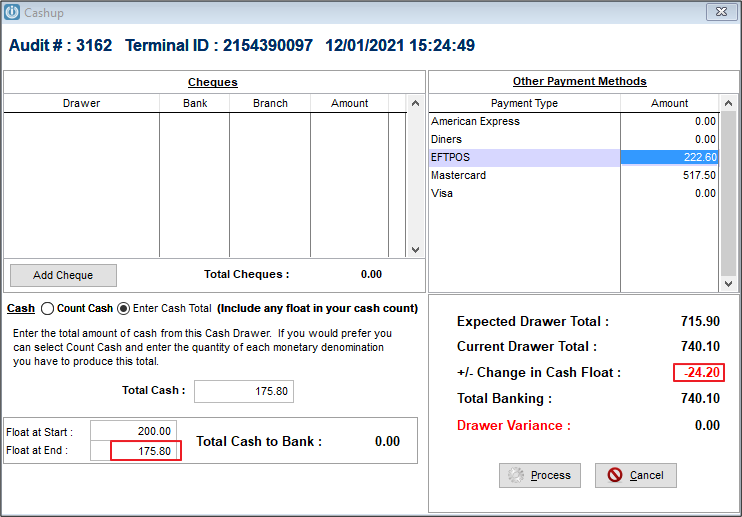
To decrease the POS Float when cash has been given out during the day
This would be used when you have a negative cash amount on the Cash up docket. When balancing the cash drawer enter the original float value as the "Float at Start" and the new float value as the "Float at End". Include the Float in the Total Cash.
The change in Float will be recorded against the General Ledger Account.
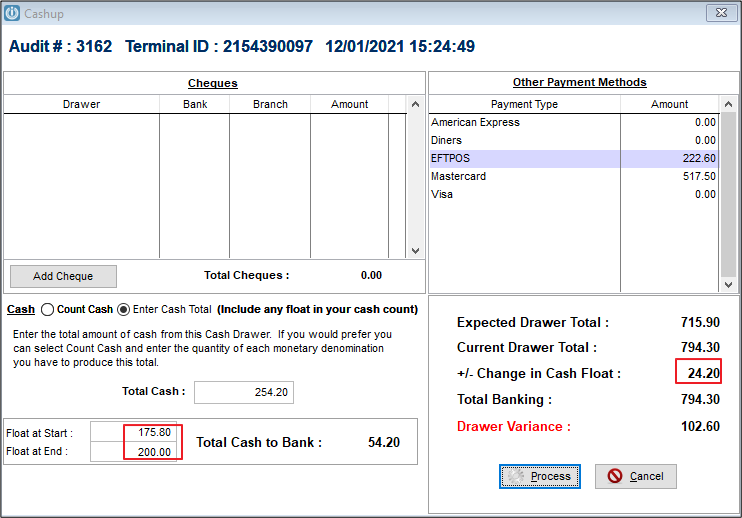
To increase the POS Float using cash from the till
When balancing the cash drawer enter the original float value as the "Float at Start" and the new float value as the "Float at End". Include the float in the Total Cash.
The change in then Float will be recorded against the General Ledger Account.

To increase the POS Float using cash from the Bank
Process a Cash Book Payment to record the money being taken from a Bank Account.
When balancing the Cash Drawer the next day, record the new opening float value as the "Float at Start". This is the closing float from the previous day, the "Float at End" will be the correct amount.
The total cash is the amount of cash on hand receipted. Part of this will be removed to change the Float
Comments
0 comments
Please sign in to leave a comment.