The Management Console is located under the File tab.
This has been updated to allow users to look at the Management Console by Location, a control is located in Admin / Manage System Defaults.

Locations can be selected by using the drop down arrow, otherwise the selector will default to the location of the staff member logged in.
It shows a a quick overview from where in the software the invoices are being generated, the Workshop, Customer Invoices or Point of Sale (POS). This is then Summarised.
Please note that all figures showing on this report exclude GST regardless of the system set up.
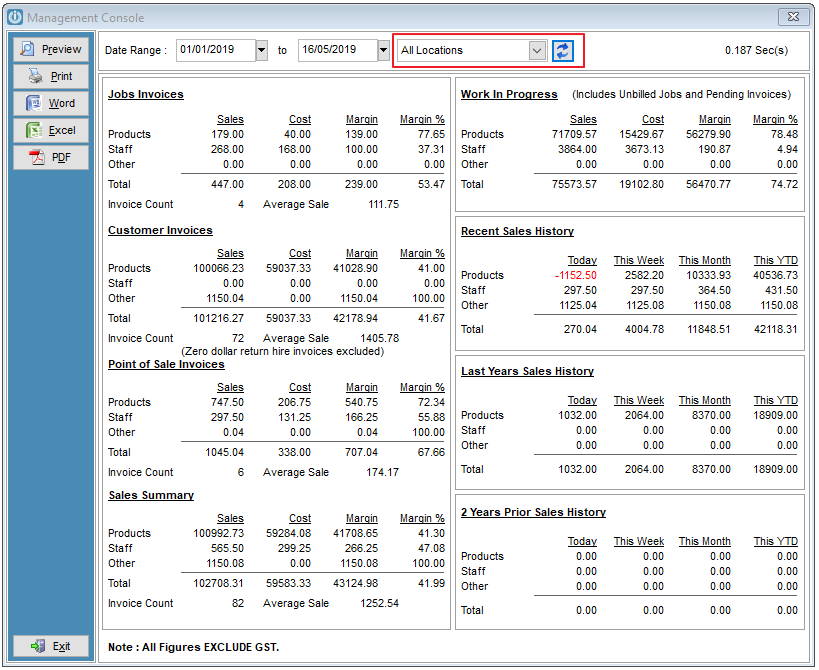
The Total shown under other, is anything entered as a General Ledger Code. Please see this Management Console What is Other what this figure may be made up of.
For a further analysis of the figures use the Sales Analysis Report by Date Range to identify any queries that may need to be followed up from this screen.
The Work In Progress total is made up of Unbilled Jobs and Pending Invoices.
Comments
0 comments
Please sign in to leave a comment.