How do we set up our Email Default for 2 Degrees or Snap?
Solution
Email Defaults are set up under Admin / Manage Email Defaults
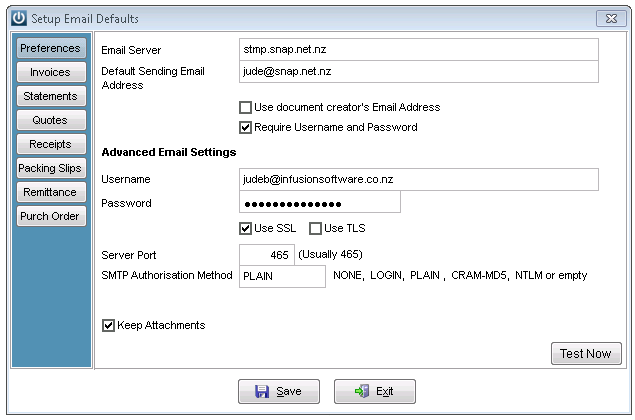
Email Server: smtp.snap.net.nz
Default Sending Email Address: the Snap.net address you are sending from
Tick Require Username and Password
Username: your snap username
Password: your snap password
Tick Use SSL
Server Port 465
SMTP Authorisation Method: PLAIN
The example is below
Save and exit
Open and select test now
Send a test now message to confirm the email settings are correct.
It may be necessary to change the Use Document Creators email address, Require Username flags or try different SMTP Authorisation Methods if necessary.
Comments
0 comments
Please sign in to leave a comment.