The Bulk Supplier Payments screen allows you to pay a number of Suppliers all at the same time.
Setup
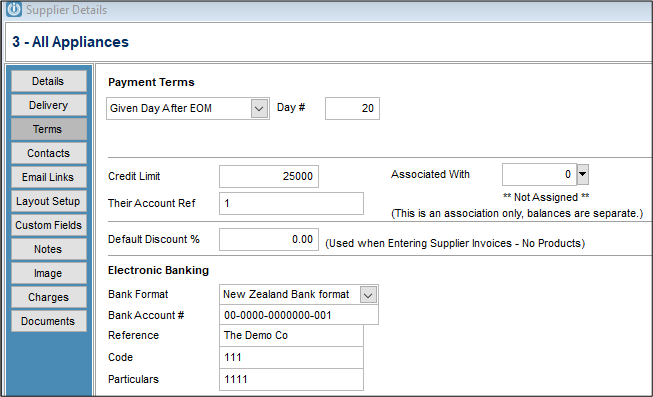
In order for the Suppliers to appear in this screen their Terms need to be set up with Electronic Banking details.
Making a Payment
This is accessed from Suppliers \ Bulk Supplier Payments by Direct Credits.
After choosing the Bank Account the Payment is to be made from the screen below appears showing all of the Supplier with Bank Account details.
To enlarge the screen use the Maximize button on the top right.
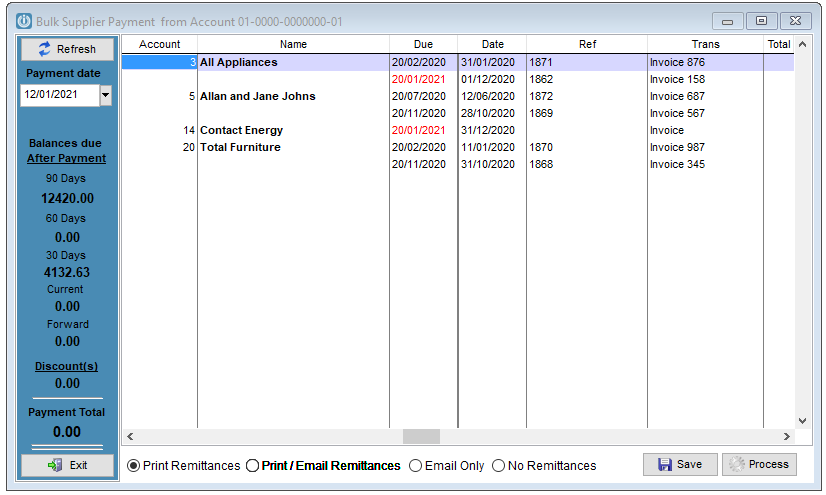
To Pay a Supplier you can double click on the Supplier Name, the individual invoice. Clicking at the top of the Balance column will select all Suppliers.
To unselect an Invoice double click on the Supplier Name or the the individual invoice. Clicking at the top of the Paying Now column will deselect all Suppliers.
The Invoices with a red Due Date are not yet due for payment.
Remittances will be sent depending on the Radio Button option selected at the bottom of the screen.
Save to make further payments or Process when finished.
If a credit and invoice are matched and the payment creates a zero balance an imbalance will occur, call Support to fix
Once Processed, a direct credit batch can be created through Prepare Direct Credit Export.
Comments
0 comments
Please sign in to leave a comment.