When emailing our Invoices or Statements we can hardly see the logo when we create the PDF, but the preview is fine. What has happened?
Solution
Please try a new logo. These need to be between 15 - 50 kb and of a suitable resolution. All reported problems with light or dark logos have been resolved by replacing the Logo to suit these sizes.
Or
A logo was found to be creating invoices with PDFs with a background that was incorrect. The Logo was saved as a .png file which supports transparency. Saving the Logo file as a .jpg file corrected the issue.
Or
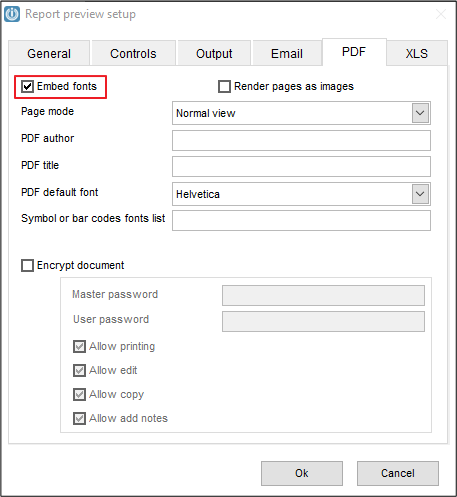
Select the Configuration option on the Foxy Toolbar when previewing a document

Go to the PDF tab and remove the tick for Render pages and images and select Embed fonts. If this does not make a difference, put back to Render pages as images.
Comments
0 comments
Please sign in to leave a comment.