Under Suppliers there is the ability to set up Charges. These can be used for anything that an Invoice is not supplied for eg Rent.
(These same instructions apply for the Customer Charges)
To add a Charge, open the Tab and select Add
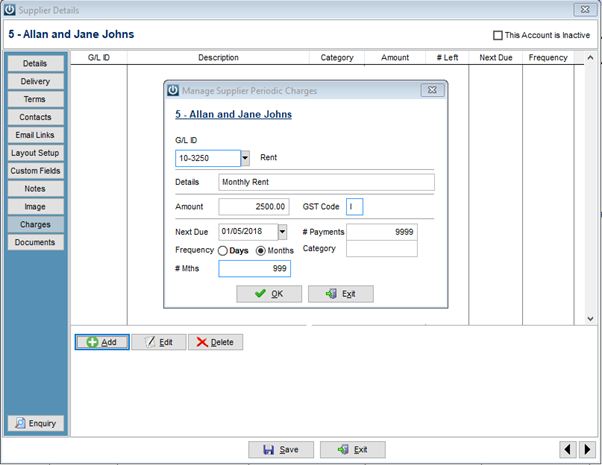
In the example below The General Ledger code for Rent was selected along with the amount, due date, frequency and every single month. Please Note: If an expense account has the GST Code set to E, there is no SUPPOPEN record. This means the Suppliers and GL Control account will have a variance. See ticket #13581.
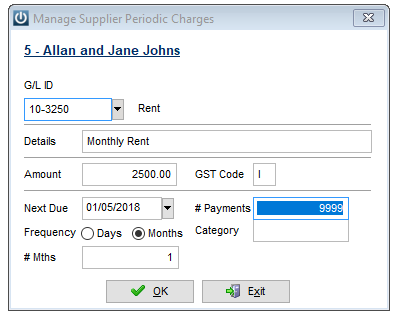
Select OK when you have finished.
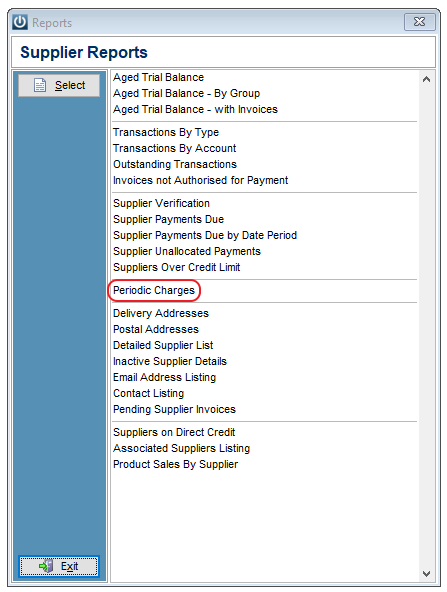
To see a record of the Charges that are needing to be Processed and the dates they are due on, go to Suppliers / Reports / Periodic Charges
To process the Charges
Select Suppliers / Process Periodic Charges from the drop down menu at the top of the screen.
The Supplier Periodic Charges screen will appear. There is an option to select Current Charges or all Charges.
Check the Include Charges Due up to date. This will show any charges that have been forwarded dated eg due on 01/05/2018 when the date is 30/4/2018.
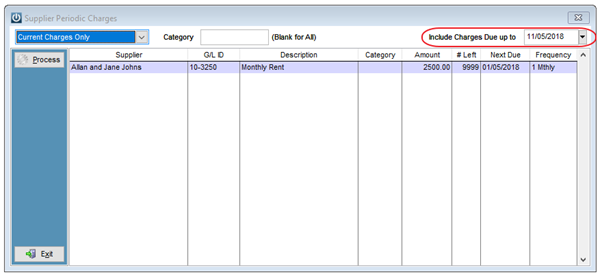
Select Process to record the Charges.
Comments
0 comments
Please sign in to leave a comment.