When I run my backup from a Workstation it is not completing - it goes to Not Responding.
Solution
First of all check the location that you are backing up to.
From the Admin menu run a Reindex to compress the size of the file to be backed up and backup again.
Backing up to the Server:
- Is there sufficient capacity?
- Have your Windows permissions been changed?
- Have the Anti Virus settings been changed? Check that Infusion is still Excluded - some updates can change the status.
- If you still cannot backup to your Server back up to your local computer. If you can successfully backup to this, contact your IT person.
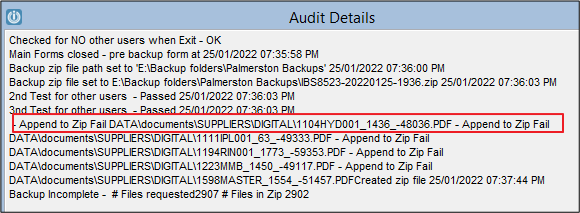
- Check the Audit Log, there may be a reason the file is not completing listed in there.
Backing up to a USB:
- Backup to the desktop - is this successful? Replace the USB
If still unable to backup call your Partner or the Support Line.
Getting an error message involves a different solution
Comments
0 comments
Please sign in to leave a comment.