We have turned on our computer this morning and our Shortcut for Infusion has disappeared this morning. How can we replace it?
Solution
If the server has been restarted or connection to the workstation has been lost is may be necessary to reinstall the Icons.
Open the file explorer  or Computer
As it is recommended that Infusion is stored in Accounting so look there first
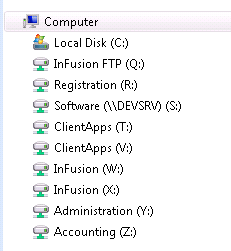
Once open we can see the Infusion Folder
Locate the ibsmain.exe if there is a Shortcut copy this on to the desktop. Test to check that it opens the correct data.

If there is no Shortcut, right click on ibsmain and select create shortcut
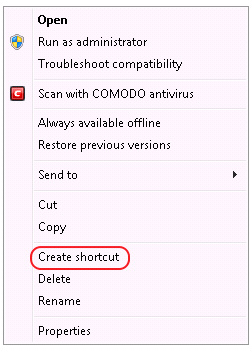
Once the Shortcut appears, copy to the desktop.
For SPROCKIT™ locate the Sprockit Application, right click on this to create the shortcut if necessary.

Comments
0 comments
Please sign in to leave a comment.