All transactions in Infusion have an Audit Trail Drill Down attached to them. This is chronologically created by the system as the transaction is entered and independent of the date recorded on the transaction. This can be viewed by right clicking on a transaction and viewing the Audit Detail.
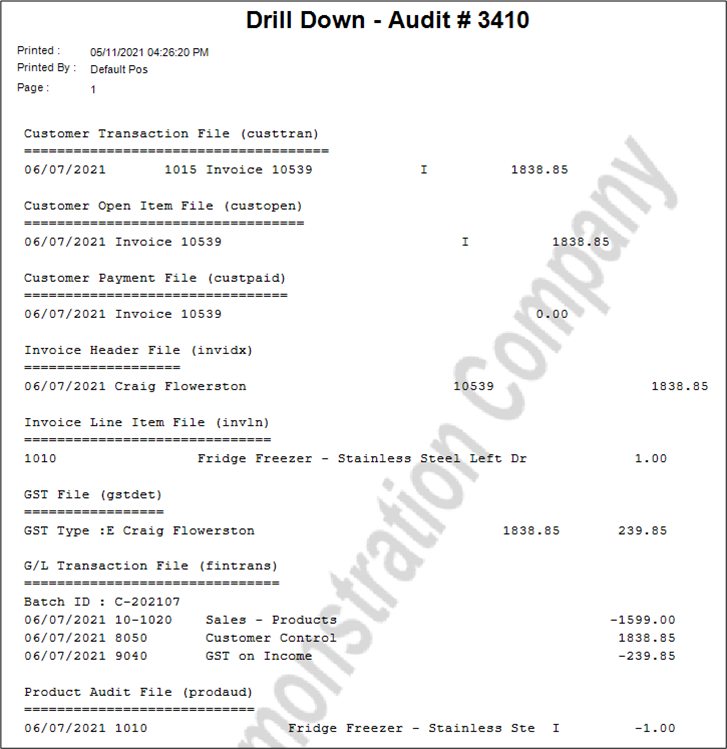
The above Audit is for a Customer Invoice and the Heading eg Customer Transaction File (custtran) shows what is recorded in that table. The identifier is the Audit Number #3410. Each of the other tables (eg custopen) contain information with the same audit number relating to this transaction.
Using the above Audit Number go to Admin / Other / View Audit Trail, enter in the Audit Number. The exact transaction may not be shown as not every transaction is recorded.
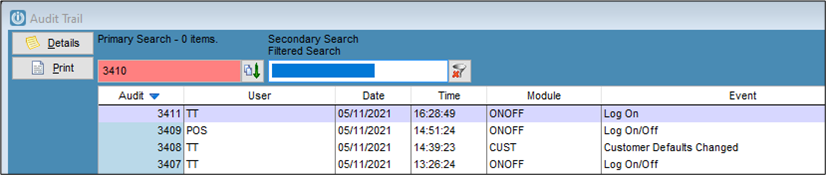
We can see here that although the date of the Invoice from above is 06/07/2021 the Audit Trail shows that it was entered on the 05/11/2021.
Comments
0 comments
Please sign in to leave a comment.