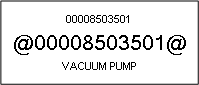
Why when I preview or print the Barcode label I see the "at" @ symbol and numbers?
Solution
This also can apply to reports or jobcards.
You need to have the Code 39 fonts (c39digit and code 39) installed on to the computer to enable you to print barcodes. Call your Partner or the Support Desk. This should be installed into the Windows \ Fonts folder on your computer.
It may be necessary to restart the computer for the barcode font to display on the labels.
Comments
0 comments
Please sign in to leave a comment.