Error: 12
Module: CHART.PF.DATAPAGEINIT
Line: 34
Message: Variable '_UNASSIGINED_' is not found.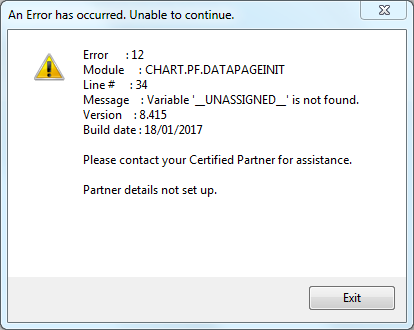
This error was noted on converted data when trying to run the ‘2Year Sales by Location’ chart under the Locations tab of the Dashboard.
The cause was an old location that had been deleted in the in the source data before the conversion because it was no longer in use. After conversion, this location did not exist in Infusion, but because the location had transactions, the chart would fail trying to find it.
To find this:
Use LOCATIONS
Browse Take note of the number of last location with a Name that is not **Unassigned**, for example: 8
Use INVIDX
Set order to location
Browse for location > X (X being the number noted before, in this example: 8)
If there are any records found with location greater than X – for example: 9 and 10, take note of these location numbers (it may be only one or more than one).
To resolve the problem, these locations have to have a name:
Select LOCATIONS
Browse
Change the name **Unassigned** to something different, for example: ZZ or INACTIVE or OLD, or even a number – anything that is not the same as another existing location name or the system reserved name **Unassigned**. Leave these locations inactive.
Log back into the software and try the chart again and this time it will not fail and it will also include the inactive locations history as expected, if they fit in the time-frame.
Comments
0 comments
Please sign in to leave a comment.