If a user is getting an error that includes a reference to SPF (Sender Policy Framework) when emailing from Infusion
Server refused mail at END OF DATA - 550 5.7.1 Message rejected (SPF)
then the required action is for whomever hosts the sender's domain / email to add the senders email address (eg infusionsoftware.co.nz) to their txt spf record.
Also see: How Microsoft 365 uses Sender Policy Framework (SPF) to prevent spoofing
For Netvalue servers have an SPF record added of:
TXT v=spf1 include:spf.protection.outlook.com include:_spf.netvalue.nz -all
Some More Information
To check the existing SPF record use a tool like MXtoolbox, select, Check SPF records
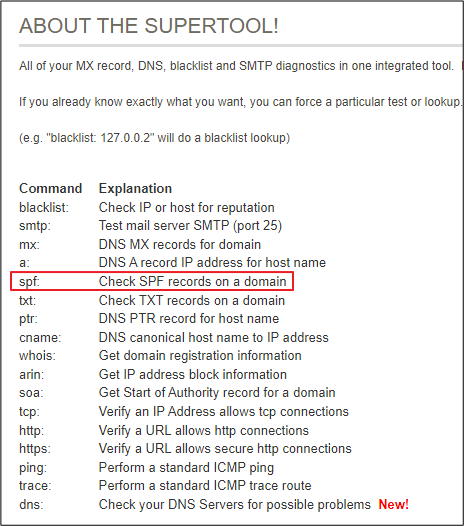
Enter the domain er Demonstration Company.co.nz and click SPF Record and you will see a record as below:

If abc.co.nz has an SPF record of:
TXT v=spf1 include:spf.protection.outlook.com -all
This means that a receiving mailserver that checks SPF records will look up the domain abc.co.nz and check the SPF record for the Mail Server associated with it. If an SPF record does not match the Mailserver the email is relayed from, the message will be denied - this is a common tactic to prevent against email spoofing.
In this case an email is being relayed from infusionsoftware.co.nz, and the gaining Mail Server is rejecting it because it's checking SPF records, and infusionsoftware.co.nz is not listed.
To prevent this, you can ask whomever hosts abc.co.nz to add infusionsoftware.co.nz to their txt spf record.
Comments
0 comments
Please sign in to leave a comment.